
Toyota Highlander Service Manual: Navigation ECU
REPLACEMENT
HINT:
- COMPONENTS: See page 67-2
- Installation is in the reverse order of removal.
1. REMOVE FRONT SEAT ASSEMBLY LH POWER SEAT (SEE PAGE 72-1 1) MANUAL SEAT (SEE PAGE 72-19 )
2. REMOVE NAVIGATION ECU COVER
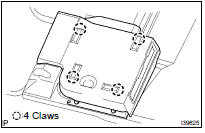
(a) Remove the 4 claws and the navigation ECU cover.
3. REMOVE NAVIGATION ECU W/BRACKET
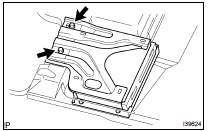
(a) Disconnect the connector.
(b) Remove the 2 bolts and the navigation ECU w/ bracket.
4. REMOVE DISC PLAYER BRACKET
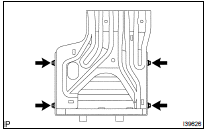
(a) Remove the 4 screws and the disc player bracket.
5. REMOVE NAVIGATION ECU
6. INSTALL NAVIGATION ECU
HINT: Perform the screen noise automatic adjustment when screen noise occurs (see page 05-1803 ).
7. INSTALL FRONT SEAT ASSEMBLY LH POWER SEAT (SEE PAGE 72-1 1) MANUAL SEAT (SEE PAGE 72-19 )
 Multi-display (CRT display) display
REPLACEMENT
HINT:
COMPONENTS: See page 67-2
Installation is in the reverse order of removal.
1. REMOVE INSTRUMENT CLUSTER FINISH PANEL SUB-ASSY CENTER (SEE PAGE 71-10
)
2. REMOVE INTEGRAT ...
 Front NO.1 speaker ASSY
REPLACEMENT
HINT:
COMPONENTS: See page 67-2
Installation is in the reverse order of removal.
1. REMOVE MULTIPLEX NETWORK MASTER SWITCH ASSY (SEE PAGE 75-6 )
2. REMOVE FRONT DOOR LOWER FRAME ...
More about Toyota Highlander:
On-vehicle inspection
HINT:
The cooling fan may rotate when the ignition switch is turned from ACC to ON.
This is normal.
1. CHECK COOLING FAN OPERATION WITH LOW TEMPERATURE (Below 83 C (181 F))
(a) Turn the ignition switch ON.
(b) Check that the cooling fan stops.
If not, check the cooling fan relay and ECT sen ...
