
Toyota Highlander Owners Manual: Installing child restraints using a seat belt (child restraint lock function belt)
- Rear-facing - infant seat/convertible seat
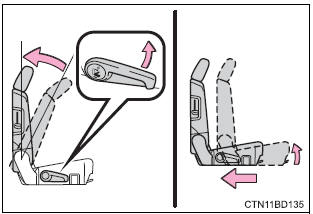
- Adjusting the seat
- Second seats
Fold the seatback while pulling the lever. Return the seatback and secure it at the 1st lock position (most upright position).
Move the seat as far back as possible.
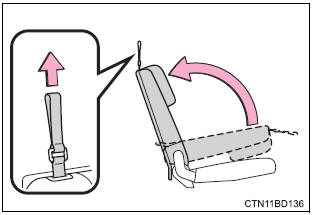
- Third seats
Fold the seatback while pulling the strap. Return the seatback and secure it at the 1st lock position (most upright position).
- Place the child restraint system on the rear seat facing the rear of the vehicle.
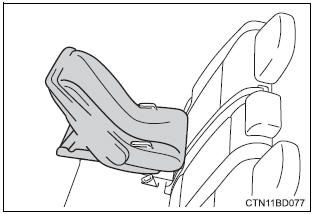
- Run the seat belt through the child restraint system and insert the plate into the buckle. Make sure that the belt is not twisted.
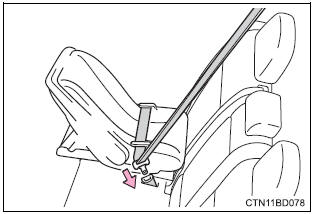
- Fully extend the shoulder belt and allow it to retract to put it in lock mode. In lock mode, the belt cannot be extended.
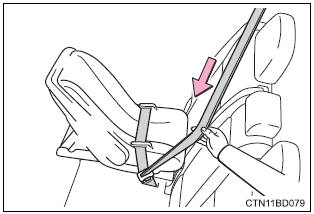
- While pushing the child
restraint system down into
the rear seat, allow the
shoulder belt to retract until
the child restraint system is
securely in place.
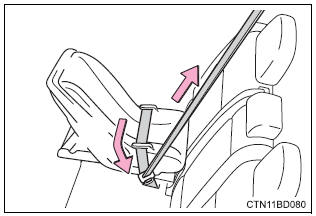
After the shoulder belt has retracted to a point where there is no slack in the belt, pull the belt to check that it cannot be extended.
- Forward-facing - convertible seat
- Adjusting the seat
- Second seats
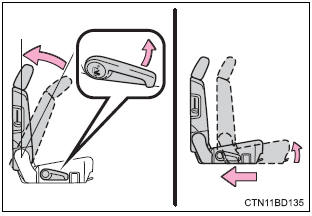
Fold the seatback while pulling the lever. Return the seatback and secure it at the 1st lock position (most upright position).
Move the seat as far back as possible.
- Third seats
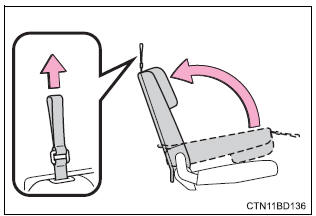
Fold the seatback while pulling the strap. Return the seatback and secure it at the 1st lock position (most upright position).
- Place the child restraint system
on the seat facing the
front of the vehicle.
If your child restraint system interferes with a head restraint and cannot be installed properly, install the child restraint system after removing the head restraint.
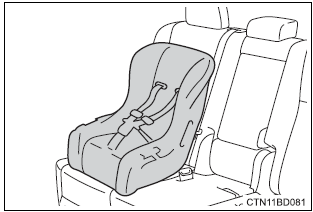
- Run the seat belt through the child restraint system and insert the plate into the buckle. Make sure that the belt is not twisted.
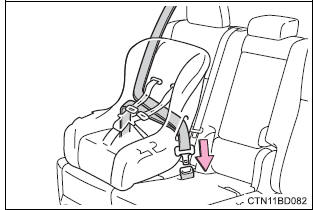
- Fully extend the shoulder belt and allow it to retract to put it in lock mode. In lock mode, the belt cannot be extended.
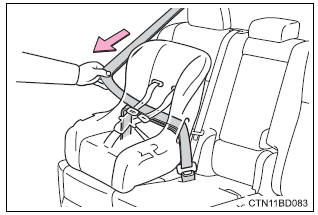
- While pushing the child
restraint system into the rear
seat, allow the shoulder belt
to retract until the child
restraint system is securely
in place.
After the shoulder belt has retracted to a point where there is no slack in the belt, pull the belt to check that it cannot be extended.
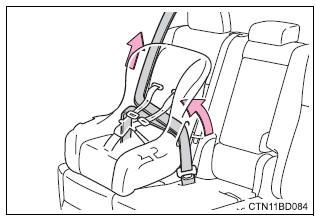
- If the child restraint has a top tether strap, the top tether strap should be latched onto the top tether strap anchor.
- Booster seat
- Adjusting the seat
- Second seats
Fold the seatback while pulling the lever. Return the seatback and secure it at the 1st lock position (most upright position).
Move the seat as far back as possible.
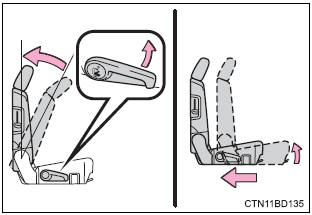
- Third seats
Fold the seatback while pulling the strap. Return the seatback and secure it at the 1st lock position (most upright position).
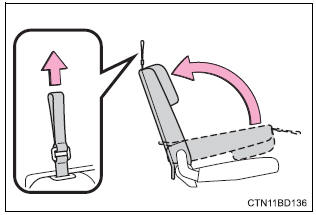
- Place the child restraint system on the seat facing the front of the vehicle.
If your child restraint system interferes with a head restraint and cannot be installed properly, install the child restraint system after removing the head restraint.
- High back type
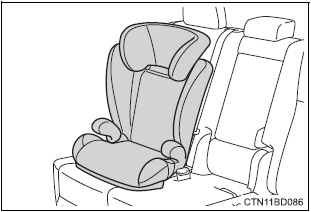
- Booster type
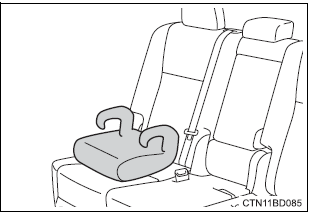
- Sit the child in the child restraint system. Fit the seat belt to the child restraint system according to the manufacturer’s instructions and insert the plate into the buckle. Make sure that the belt is not twisted.
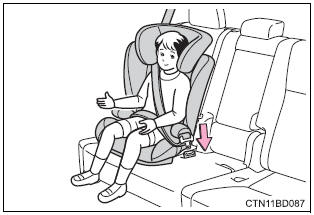
Check that the shoulder belt is correctly positioned over the child"¦s shoulder and that the lap belt is as low as possible.
Removing a child restraint installed with a seat belt
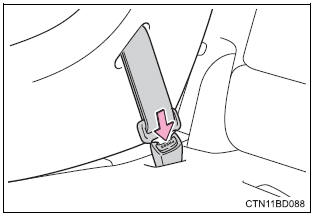
Push the buckle release button and fully retract the seat belt.
 Installation with latch system
Fold the seatback while pulling
the lever. Return the seatback
and secure it at the 1st lock
position (most upright position).
Move the seat as far back as
possible.
If your child restr ...
 Child restraint systems with a top tether strap
Raise the head restraint so that
the top tether strap can easily
be passed between the head
restraint and seatback.
If your child restraint system interferes
with a head restraint and can ...
More about Toyota Highlander:
Rear suspension arm ASSY NO.2 LH (FF)
REPLACEMENT
HINT:
COMPONENTS: See page 27-2 .
1. REMOVE REAR WHEEL
2. REMOVE REAR SUSPENSION ARM ASSY NO.2 LH
(a) Support the rear axle carrier with a jack.
(b) Remove the bolt, and disconnect the rear suspension
arm assy No.2 (inner side).
(c) Remove the bolt, nut and the rear suspe ...
