
Toyota Highlander Service Manual: ECM (3MZ-FE)
REPLACEMENT
1. DISCONNECT BATTERY NEGATIVE TERMINAL
2. REMOVE FRONT DOOR SCUFF PLATE RH (See page 71-10 )
3. REMOVE COWL SIDE TRIM SUB-ASSY RH (See page 71-10 )
4. REMOVE GLOVE COMPARTMENT DOOR ASSY (See page 71-10 )
5. REMOVE INSTRUMENT PANEL FINISH PANEL LOWER NO.2 (See page 71-10 )
6. REMOVE ECM
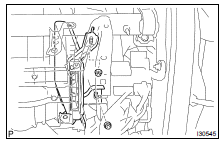
(a) Remove the 2 wire harness clamps.
(b) Disconnect the 5 ECM connectors.
(c) Remove the 2 nuts and ECM.
7. REMOVE ECM BRACKET NO. 1
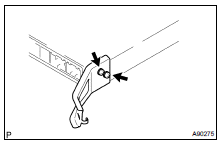
(a) Remove the 2 screws and ECM bracket.
8. REMOVE ECM BRACKET NO. 2
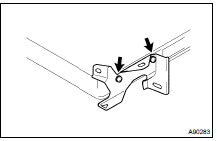
(a) Remove the 2 screws and ECM bracket.
9. INSTALL ECM BRACKET NO. 2
(a) Install the ECM bracket with the 2 screws.
10. INSTALL ECM BRACKET NO. 1
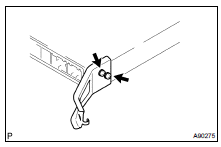
(a) Install the ECM bracket with the 2 screws.
11. INSTALL ECM
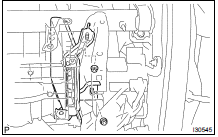
(a) Install the 2 wire harness clamps.
(b) Connect the 5 ECM connectors.
(c) Install the ECM with the 2 nuts.
Torque: 5.5 NVm (56 kgfVcm, 49 in.Vlbf)
12. INSTALL INSTRUMENT PANEL FINISH PANEL LOWER NO.2 (See page 71-10 )
13. INSTALL GLOVE COMPARTMENT DOOR ASSY (See page 71-10 )
14. INSTALL COWL SIDE TRIM SUB-ASSY RH (See page 71-10 )
15. INSTALL FRONT DOOR SCUFF PLATE RH (See page 71-10 )
16. CONNECT BATTERY NEGATIVE TERMINAL
 Knock sensor (3MZ-FE)
REPLACEMENT
1. DISCHARGE FUEL SYSTEM PRESSURE (See page 11-35 )
2. DRAIN ENGINE COOLANT (See page 16-26 )
3. REMOVE V-BANK COVER SUB-ASSY (See page 14-149 )
4. REMOVE AIR CLEANER CAP SUB-ASSY (See ...
 Accelerator pedal rod ASSY (3MZ-FE)
REPLACEMENT
1. REMOVE ACCELERATOR PEDAL ROD ASSY
(a) Disconnect the accelerator pedal position sensor connector.
(b) Remove the 2 bolts and pedal rod.
2. INSTALL ACCELERATOR PEDAL ROD ASSY
(a ...
More about Toyota Highlander:
Outside rear view
mirrors
Adjustment procedure
To select a mirror to adjust, turn
the switch.
Left
Right
To adjust the mirror, move the
switch.
Up
right
down
left
Folding the mirrors
Push the mirror back in the direction
of the vehicle’s rear.
Mirror angle can be adjusted ...
