
Toyota Highlander Owners Manual: Air conditioning controls
Toyota Highlander Owners Manual / Interior features / Using the air conditioning
system and defogger / Rear manual air
conditioning system / Air conditioning controls
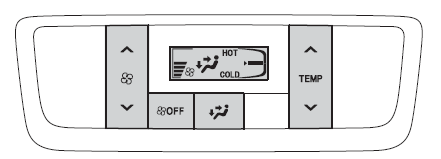
Adjusting the temperature setting
- To adjust the temperature setting, press "
 "
"
on to increase
the temperature and " " to
" to
decrease the temperature.
Fan speed setting
To adjust the fan speed, press " "
"
on  to increase the fan
speed and " " to decrease the fan
speed.
Press  to turn the fan off.
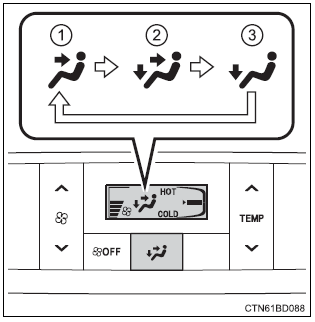
Changing airflow modes
To change the airflow mode,
press  .
.
The air outlets used are switched each time the button is pressed.
- Air flows to the upper body.
- Air flows to the upper body and feet.
- Air flows to the feet.

 Air outlets
Location of air outlets
The air outlets and air volume
change according to the
selected airflow mode.
Adjusting the position of and opening and closing the air outlets
Direct air flow to the ...
More about Toyota Highlander:
Voltage inverter ASSY
REPLACEMENT
HINT:
COMPONENTS: See page 67-2
Installation is in the reverse order of removal.
1. REMOVE INSTRUMENT CLUSTER FINISH PANEL ASSY CENTER (SEE PAGE 71-10 )
2. REMOVE FRONT SEAT ARMREST ASSY CENTER (SEE PAGE 71-10 )
3. REMOVE CONSOLE BOX ASSY (SEE PAGE 71-10 )
4. REMOVE VOLTAGE ...
В© 2011-2026 Copyright www.tohighlander.com
