
Toyota Highlander Owners Manual: Air conditioning controls
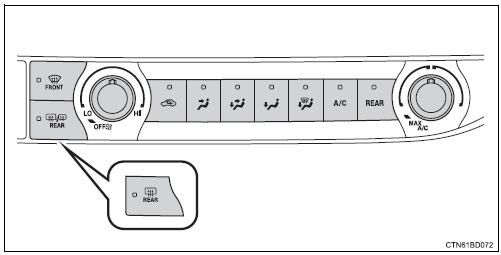
Adjusting the temperature setting
To adjust the temperature setting, turn
 clockwise (warm) or
counterclockwise (cool).
If  is not pressed, the system will
blow ambient temperature air
or heated air.
For quick cooling, turn  to the "max
a/c" position. The air conditioning
will automatically turn on in recirculated air mode.
Fan speed setting
To adjust the fan speed, turn 
clockwise (increase) or counterclockwise
(decrease).
Turning the dial to “off� turns off the fan.
Changing airflow modes
To change the airflow mode,
press  ,
,
 ,
,
 or
or
 .
.
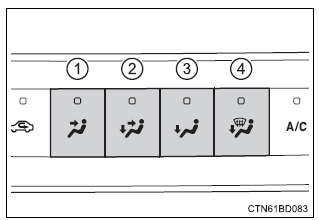
- Air flows to the upper body.
- Air flows to the upper body and feet.
- Air flows to the feet.
- Air flows to the feet and the windshield defogger operates.

 Other functions
Switching between outside air and recirculated air mo
Press .
The mode switches between outside air mode (indicator off) and recirculated
air mode (indicator on) each time
is pressed.
D ...
More about Toyota Highlander:
Rear spoiler
REPLACEMENT
1. REMOVE BACK WINDOW PANEL TRIM UPPER (See page 75-20 )
2. REMOVE REAR SPOILER
(a) Remove the 2 bolts and nut.
(b) Using a heat light, heat the body and rear spoiler to 40 to
60 C (104 to 140 F).
NOTICE:
Do not heat the rear spoiler excessively.
(c) Tie both piano wire ends ...
