
Toyota Highlander Owners Manual: Connecting a bluetooth® device
Up to 5 bluetooth® devices (phones [hfp] and audio players [avp]) can be registered.
If more than 1 bluetooth® device has been registered, select which device to connect to.
- Press the “setup� button.
- Select “bluetooth*�.
*: Bluetooth is a registered trademark of bluetooth sig, inc.
- Select the device to be connected.
Supported profile icons will be displayed.
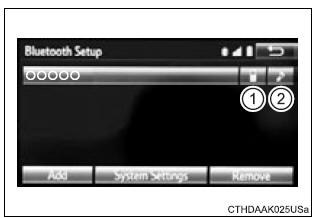
- Phone
- Audio player
Supported profile icons for currently connected devices will illuminate.
Dimmed icons can be selected to connect to the function directly.
Auto connection
To turn auto connection mode on, set "bluetooth* power" to on.
When you register a phone, auto connection will be activated. Always set it to this mode and leave the bluetoothr phone in a place where a connection can be established.
When the audio system is turned to on, the system will search for a nearby cellular phone you have registered.
Next, the system automatically connects with the most recent of the phones connected to in the past. Then, the connection result is displayed.
*: Bluetooth is a registered trademark of bluetooth sig, inc.
Manual connection
When auto connection has failed or "bluetooth* power" is turned off, you must connect the bluetoothr device manually.
*: Bluetooth is a registered trademark of bluetooth sig, inc.
- Follow the steps in "connecting a bluetoothr device" from "step 1".
Connecting a bluetooth® audio player
- Registering an additional device
- select "select device" on the bluetoothr audio control screen.
- For more information:
- selecting a registered device
- select "select device" on the bluetoothr audio control screen.
- For more information:
Reconnecting a bluetooth® phone
If the system cannot connect due to poor signal strength, the system will automatically attempt to reconnect.
If the phone is turned off, the system will not attempt to reconnect. In this case, the connection must be made manually, or the phone must be reselected.
 Registering a bluetooth®
device
Registering a bluetooth®
device
Bluetooth® compatible phones (hfp) and portable audio players
(avp) can be registered simultaneously. You can register up to 5
bluetooth® devices.
How to register a bluetooth® device
Display ...
 Displaying a bluetooth®
device details
Displaying a bluetooth®
device details
You can confirm and change the registered device details.
Bluetooth® device registration status
Display the "bluetooth* setup" screen.
*: Bluetooth is a registered trademark of blue ...
More about Toyota Highlander:
Correct use of the seat belts
Extend the shoulder belt so that
it comes fully over the shoulder,
but does not come into contact
with the neck or slide off the
shoulder.
Position the lap belt as low as
possible over the hips.
Adjust the position of the seatback.
Sit up straight and well
back in th ...
