
Toyota Highlander Service Manual: Antenna cord sub-ASSY NO.3
REPLACEMENT
HINT:
- COMPONENTS: See page 76-21
- Installation is in the reverse order of removal.
1. REMOVE ROOF HEADLINING ASSY (SEE PAGE 76-21 )
HINT: Refer to the procedures up to "REMOVE ROOF HEAD LINING ASSY".
2. REMOVE ANTENNA CORD SUB-ASSY NO.3
(a) Remove the antenna cord sub assy No. 3 from the roof headlining.
3. INSTALL ANTENNA CORD SUB-ASSY NO.3
(a) Tape the antenna cord sub-assy No. 3 at the position of the roof headlining shown in the illustration.
NOTICE: The antenna cord sub assy should come to the center of the tape (100 mm x 25 mm) when taped.
Try not to touch the adhesive side of the tape when taping.
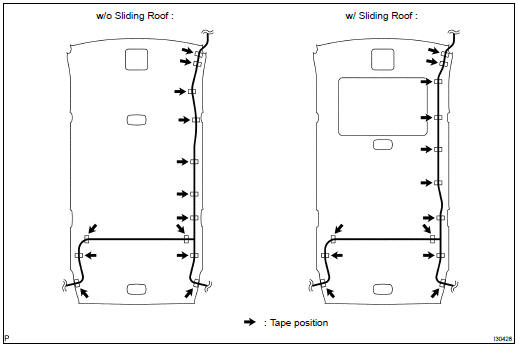
4. INSTALL ROOF HEADLINING ASSY (SEE PAGE 76-21 )
HINT: Refer to the procedures from "INSTALL ROOF HEAD LINING ASSY".
 Antenna cord sub-ASSY NO.2
REPLACEMENT
HINT:
COMPONENTS: See page 67-2
Installation is in the reverse order of removal.
1. REMOVE INSTRUMENT PANEL SAFETY PAD SUB-ASSY W/PASSENGER AIR BAG ASSY
(SEE PAGE 71-10 )
HINT: ...
 Amplifier antenna ASSY
REPLACEMENT
HINT:
COMPONENTS: See page 76-21
Installation is in the reverse order of removal.
1. REMOVE ROOF HEADLINING ASSY (SEE PAGE 76-21 )
HINT:
Refer to the procedures up to "REMOVE R ...
More about Toyota Highlander:
Stowing the flat tire, jack and all tools (with a full-size spare tire)
Remove the center wheel ornament by pushing from the reverse
side.
Be careful not to lose the wheel ornament.
Stand the tire against the
bumper with the inner surface
facing toward you and install
the outside spare tire cover.
Pass the hoist assembly (c)
and holding bracke ...
