
Toyota Highlander Owners Manual: Using the steering wheel switches
Toyota Highlander Owners Manual / Audio system / Bluetooth® phone / Using the steering
wheel switches
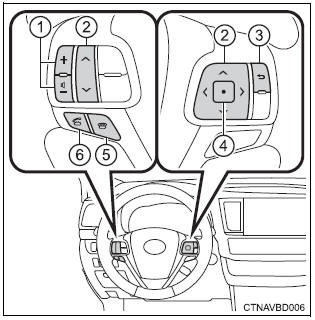
The steering wheel switches can be used to operate a connected cellular phone.
Operating a telephone using the steering wheel switches
- Volume switch
- increase/decrease the volume
- press and hold: continuously increase/ decrease the volume
- cursor switch
- select a list/tab
- back switch
- return to the previous screen
- enter switch
- select an item
- on hook switch
- end a call
- refuse a call
- off hook switch
- make a call
- receive a call
- display “phone� screen
 Bluetooth® phone
message function
Bluetooth® phone
message function
Received messages can be forwarded from the connected
bluetooth® phone, enabling checking and replying using the
audio system.
Depending on the type of bluetooth® phone connected, received
mes ...
 Bluetooth® phone
settings
Bluetooth® phone
settings
You can adjust the hands-free system to your desired settings
“Phone/message settings� screen
To display the screen shown below, press the "setup" button, and
select "phone" ...
More about Toyota Highlander:
Wireless remote control
Vehicles without a smart key system
Locks the doors
Unlocks the doors
Opens the windows and moon
roof*
Sounds the alarm
Opens and closes the power
back door (if equipped)
*: This setting must be customized at your toyota dealer.
Vehicles with a smart key ...
© 2011-2026 Copyright www.tohighlander.com
