
Toyota Highlander Owners Manual: Speaking on the phone
The following screen is displayed when speaking on the phone.
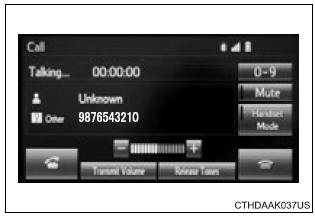
To adjust the call volume
Select “-� or “+�. You can also adjust the volume using the steering switches or the volume knob.
To prevent the other party from hearing your voice
Select “mute�.
Inputting tones
When using phone services such as an answering service or a bank, you can store phone numbers and code numbers in the contact.
- Select “0-9�.
- Input the number.
Release tones
“Release tones� appear when a continuous tone signal(s) containing a (w) is registered in the contact list.
- Select “release tones�.
Release tones
- A continuous tone signal is a character string that consists of numbers and the characters p or w. (E.G.056133W0123p#1*)
- when the "p" pause tone is used, the tone data up until the next pause tone will be automatically sent after 2 seconds have elapsed. When the "w" pause tone is used, the tone data up until the next pause tone will be automatically sent after a user operation is performed.
- Release tones can be used when automated operation of a phone based service such as an answering machine or bank phone service is desired. A phone number with continuous tone signals can be registered in the contact list.
- Tone data after a "w" pause tone can be operated on voice command during a call.
To transfer a call
Select “handset mode� to on from a hands-free call to a cellular phone call.
Select “handset mode� to off from a cellular phone call to a hands-free call.
Transmit volume setting
- Select “transmit volume�.
- Select the desired level for the transmit volume.
- Select “ok�.
To hang up
Press the  switch on the steering
wheel or select  .
.
Call waiting
When a call is interrupted by a third party while talking, an incoming call message will be displayed.
To talk with the other party:
- press the
 switch on
the steering wheel. - Select
 .
.
To refuse the call:
- press the
 switch on
the steering wheel. - Select
 .
.
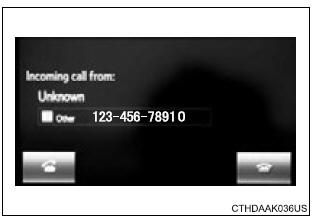
Every time you press the switch
on the steering wheel or select
during call waiting, you will be
switched to the other party.
Transferring calls
- ?If you transfer from the cellular phone to hands-free, the hands-free screen will be displayed, and you can operate the system using the screen.
- Transfer method and operation may vary according to the cellular phone used.
- For operation of the cellular phone in use, see the phone's manual.
Call waiting operation
Call waiting operation may differ depending on your phone company and cellular phone.
 Receiving a call
When a call is received, the following screen is displayed
together with a sound.
To answer the phone
Press the switch on the steering
wheel or select .
To refuse a call
Press the switch o ...
 Bluetooth® phone
message function
Bluetooth® phone
message function
Received messages can be forwarded from the connected
bluetooth® phone, enabling checking and replying using the
audio system.
Depending on the type of bluetooth® phone connected, received
mes ...
More about Toyota Highlander:
Front passenger occupant classification system
Your vehicle is equipped with a front passenger occupant classification
system. This system detects the conditions of the front
passenger seat and activates or deactivates the devices for the
front passenger.
Seat belt reminder light
Srs warning light
“air bag off� indicator light ...
