
Toyota Highlander Service Manual: Multi-display (CRT display) display
REPLACEMENT
HINT:
- COMPONENTS: See page 67-2
- Installation is in the reverse order of removal.
1. REMOVE INSTRUMENT CLUSTER FINISH PANEL SUB-ASSY CENTER (SEE PAGE 71-10 )
2. REMOVE INTEGRATION CONTROL & PANEL ASSY
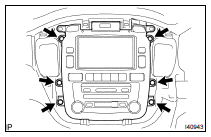
(a) Remove the 6 bolts.
(b) Disconnect the connectors and remove the integration control & panel assy.
3. REMOVE MULTI-DISPLA Y CONTROLER BRACKET A
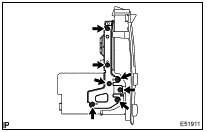
(a) Remove the 7 screws and multi-display controller bracket A.
4. REMOVE MULTI-DISPLA Y CONTROLER BRACKET B
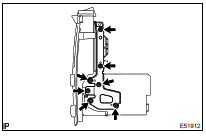
(a) Remove the 7 screws and multi-display controller bracket B.
5. REMOVE MULTI-DISPLA Y (CRT DISPLAY) DISPLAY
6. INSTALL MULTI-DISPLA Y (CRT DISPLAY) DISPLAY
HINT: Perform the screen noise automatic adjustment when screen noise occurs (see page 05-1803 ).
 Radio receiver ASSY
REPLACEMENT
HINT:
COMPONENTS: See page 67-2
Installation is in the reverse order of removal.
1. REMOVE INSTRUMENT CLUSTER FINISH PANEL SUB-ASSY CENTER (SEE PAGE 71-10
)
2. REMOVE INTEGRAT ...
 Navigation ECU
REPLACEMENT
HINT:
COMPONENTS: See page 67-2
Installation is in the reverse order of removal.
1. REMOVE FRONT SEAT ASSEMBLY LH
POWER SEAT (SEE PAGE 72-1 1)
MANUAL SEAT (SEE PAGE 72-19 )
2. ...
More about Toyota Highlander:
Inspection
1. INSPECT POWER WINDOW REGULATOR SWITCH ASSY
(a) Check continuity.
Check the continuity between the terminals when
battery voltage is applied to terminals 1 and 8.
Standard:
If the continuity is not as specified, replace the switch. ...
