
Toyota Highlander Owners Manual: List screen operation
When a list screen is displayed, use the appropriate buttons to scroll through the list.
How to scroll
 : Select to scroll
to the next
or previous page.
 : If
appears to the right
: If
appears to the right
of
titles, the complete titles are
too long for the display. Select
this button to scroll the title.
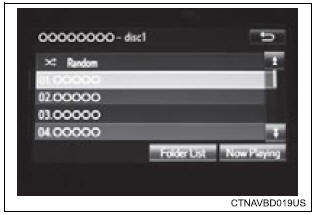
Turn the “tune·scroll� knob to move the cursor box to select a desired item from the list, and press the “tune·scroll� knob to play it. The track that is being played is highlighted.
To return to the top screen, select “now playing� on the list screen.
Selecting, fast-forwarding and reversing tracks/files/songs
Selecting a track/file/song
Press the " " or "
 "
"
button on "seek/track" or turn the
"tune¢pscroll" knob to select the desired track/file/song number.
To fast-forward or reverse, press and hold the "„¬" or "„Â" button on "seek/track".
Selecting a track/file/song from the track/file/song list
- Select “browse� or cover art.
- Select the desired play mode. (Usb and ipod)
- Select the desired track/file/ song.
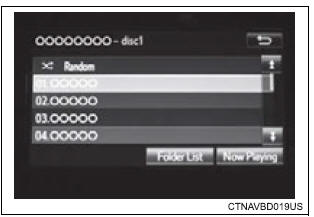
When an mp3/wma/aac disc or usb memory device is being used, the folder can be selected. When a bluetooth® device or ipod is being used, the album can be selected.
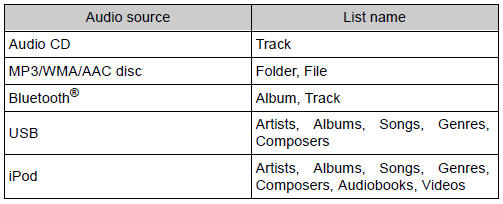
According to the audio device, the following is displayed.
 Selecting the audio
source
Selecting the audio
source
Switching between audio sources such as radio and cd are
explained in this section.
Changing audio source
Press the “audio� button to display the audio source selection
screen.
If the au ...
 Optimal use of the
audio system
Optimal use of the
audio system
On the “sound settings� screen, sound quality (treble/mid/
bass), volume balance can be adjusted.
How to adjust the sound settings and sound quality
1,2,3 Select “-� or “+� to adjust
t ...
More about Toyota Highlander:
Automatic transaxle ASSY (U241E/U140F)
REPLACEMENT
1. REMOVE ENGINE ASSY W/ TRANSAXLE (SEE PAGE 14-24 )
2. REMOVE FRONT DRIVE SHAFT ASSY RH (SEE PAGE 30-21 )
3. REMOVE FRONT DRIVE SHAFT ASSY LH (SEE PAGE 30-21 )
4. REMOVE TRANSVERSE ENGINE ENGINE MOUNTING BRACKET (4WD DRIVE TYPE) (SEE
PAGE 31-9 )
5. REMOVE TRANSFER ASSY (4WD DRIVE ...
