
Toyota Highlander Owners Manual: Display contents
 Drive information
Select to display various drive data.
 Navigation
systemlinked
display (if
equipped)
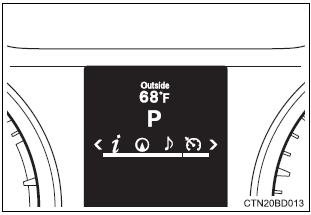
Select to display the following navigation system-linked information.
- Route guidance
- Compass display (north-up display/heading-up display)
 Audio
Audio
system-linked display
Select to enable selection of an audio source or track on the meter using the meter control switches.
 Dynamic radar cruise control
operation guide (if equipped)
Select to display operation procedures of the dynamic radar cruise control.
The  tab will
change to  when the
vehicle is in constant
speed control mode.
If activated, the operational status of the lda (lane departure alert)
system will also be displayed. (If equipped)
 Lda (lane
departure alert) operational status (if equipped)*
Select to display the operational status of the lda (lane departure alert). If activated, the operation procedures of the dynamic radar cruise control system will also be displayed. (If equipped) *: The lda operational status will not be displayed if the dynamic radar cruise control operation guide is displayed.
 Warning message
display
Select to display warning messages and measures to be taken if a malfunction is detected.
 Settings display
Select to change the meter display settings.
- Operating the meter control switches
- Enter/set/reset
- Select an item/change pages
- Return to the previous screen
- press: displays the screen registered as the top screen when no screen has been registered, the drive information screen will be displayed.
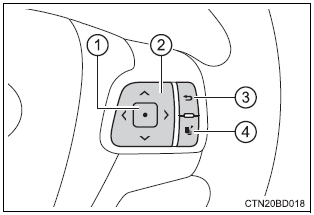
Press and hold: registers the currently displayed screen as the top screen
When the confirmation screen is displayed, select yes to register the screen. If the selected screen cannot be registered, a registration failure message will be shown.

 Drive information
Current fuel consumption*1
displays the current rate of fuel consumption
average fuel economy (after reset*2/after start/after refuel)*1
displays the average fuel economy since the func ...
More about Toyota Highlander:
Components
...
